KyomiFrom Question to Dashboard in Minutes
AI analytics for your data warehouse. Ask questions in plain English, get instant insights and shareable dashboards—works with BigQuery, Snowflake, PostgreSQL, and 7 more.

AI analytics for your data warehouse. Ask questions in plain English, get instant insights and shareable dashboards—works with BigQuery, Snowflake, PostgreSQL, and 7 more.
Connect your data warehouse or database
BigQuery • Snowflake • PostgreSQL • MySQL • ClickHouse • Redshift • Databricks • SQL Server • Azure Synapse
From question to insights you can share in one seamless workflow
Type your question in plain English. No SQL knowledge required.
AI finds the right data, writes the query, and creates visualizations instantly.
One click to turn your insights into actionable dashboards.
Full control with code-based dashboards when you need it.
Publish dashboards, add filters, and collaborate with your team.
AI remembers your business context and gets smarter over time.
Tell Kyomi what to monitor in plain English: "Alert me if daily revenue drops more than 10%" or "Send me a weekly sales summary every Monday."
Kyomi's AI runs on your schedule—hourly, daily, or weekly. It analyzes your data and decides when something is noteworthy.
Receive alerts via Slack, email, or in-app. Only when thresholds are crossed or anomalies detected. No noise, just signal.
Mention @kyomi with a question and get instant answers. No context switching, no logging into another tool.
Visualizations appear as images right in Slack. Share insights with your team without screenshots or exports.
Continue any Slack conversation in the Kyomi web app for deeper analysis. Full context preserved.
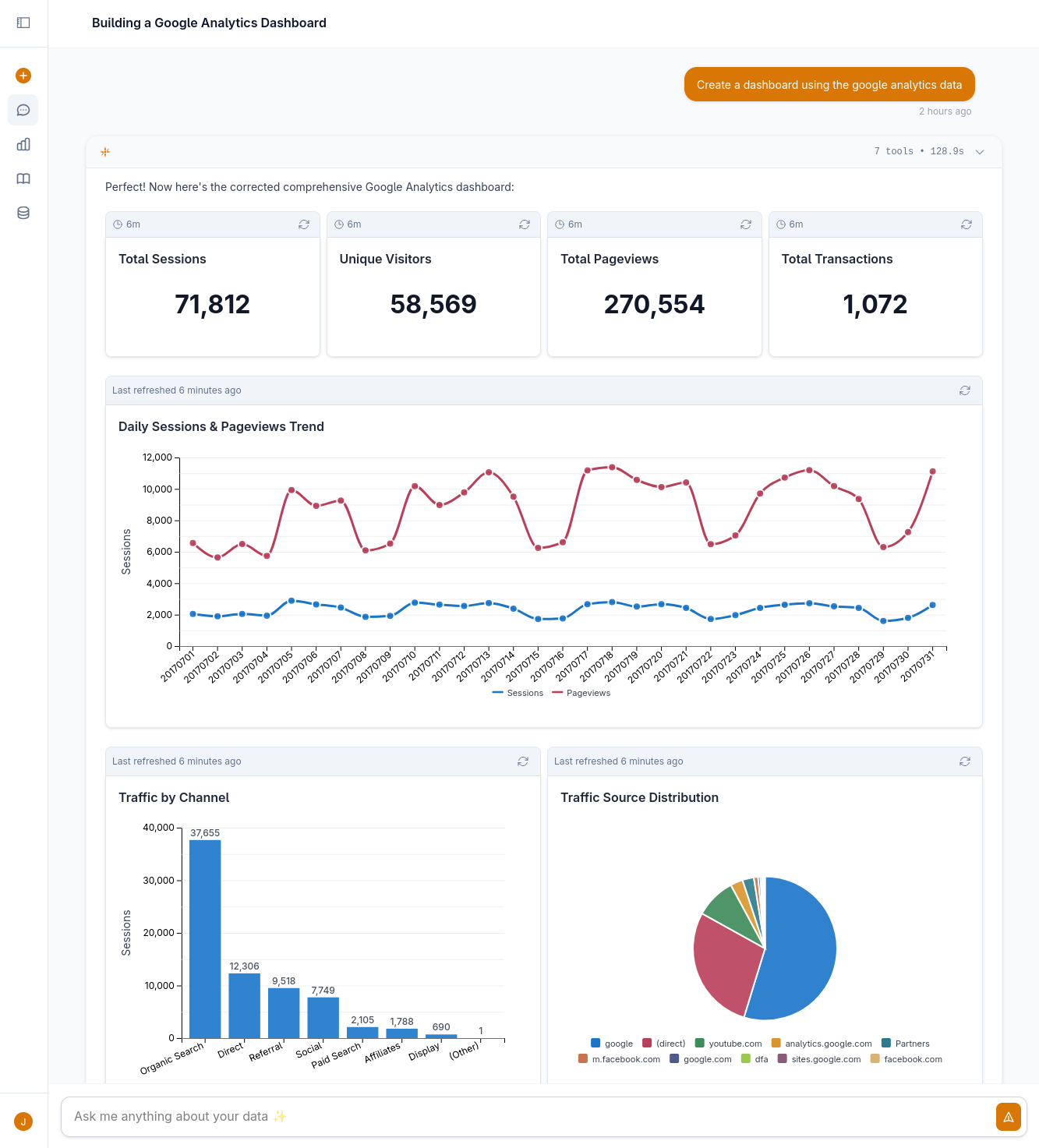
Ask questions in plain English, get instant visualizations
1. Connect your data → Kyomi securely connects to your data warehouse or database. OAuth for cloud platforms, encrypted credentials for others.
2. Ask questions → AI understands your question, finds the right tables across any connected datasource, and writes optimized SQL automatically.
3. Get insights → Instant visualizations, interactive charts, and shareable dashboards. Save anything interesting with one click.
Get insights in minutes, not days. No waiting on analysts or rebuilding in multiple tools.
AI learns your metrics and business definitions. Everyone gets the same answer to the same question.
Start simple with chat. Grow to fully customized, code-based dashboards when you're ready.
Free SQL editor and up to 5 dashboards—forever. Pay only for AI features. Upgrade when you need more.
Traditional BI tools force you to choose: simple chat interfaces with no customization, or powerful dashboards that require weeks of setup.
Kyomi bridges the gap. Start with a question, refine conversationally, save to a dashboard, and customize when needed—all in one seamless workflow.
Start free with trial AI features. No credit card required.
Setup takes less than 1 minute